
Free trial
Without a license, AD2SPIDER runs in trial mode for 14 days, with every feature and no URL limit per crawl. When the trial ends it switches to the free version, which never expires: every feature with a maximum of 600 URLs per crawl. Your projects and crawls stay open and exportable. White-label reports (with no mention of AD2SPIDER) are only in the license.
A license that doesn’t cover the installed version, belongs to another computer or has been revoked also works as the free version while you sort it out.
The license line at the bottom of the sidebar always shows the status: trial days left, free version, license holder or the problem it has.
Activate your license
When you buy, you receive your license by email: a text that starts with AD2SPIDER-LICENSE-1.
- Click the license line at the bottom of the sidebar (during the trial it says “Trial: N days…”).
- Paste the license into Paste your license here.
- Click Activate.
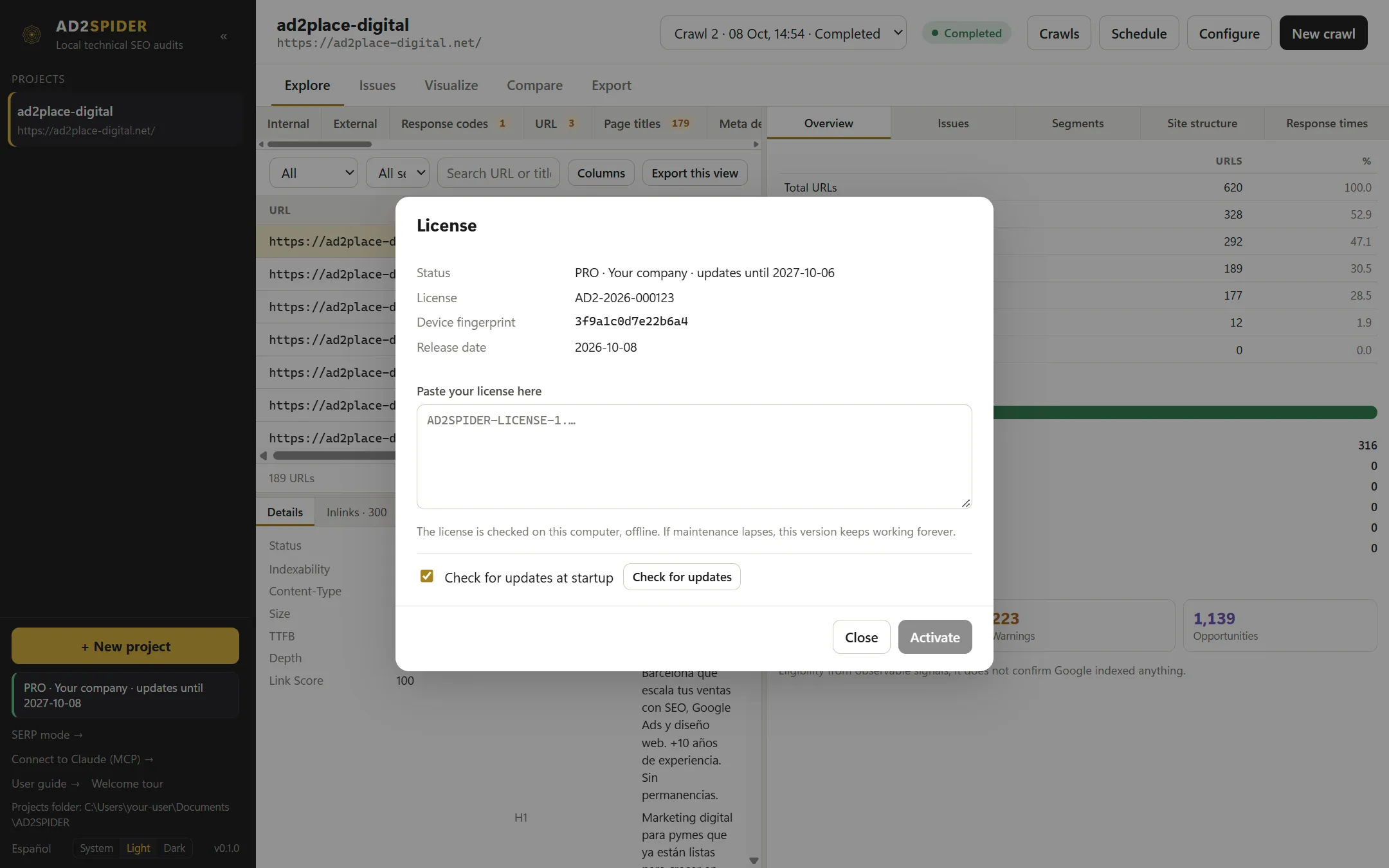
Each license is for one person and works on up to two of their computers (for example, a laptop and a desktop). It’s issued with the Device fingerprint of each computer, which you can see in this same window.
The license is checked on your computer, offline: you don’t need an internet connection to activate it or to use the app. The window shows the status, the license ID, the Device fingerprint and the date of the installed version.
| Status | What it means |
|---|---|
| Active license | Everything is available, with the date until which you get updates. |
| Covered version (updates ended) | Your maintenance has ended, but this version keeps working forever. |
| Version newer than your maintenance | You’ve installed a version released after your maintenance expired: go back to a covered version or renew. |
| License for another computer | The license is tied to other computers. Write to us to add this one (up to two per person) or to transfer it. |
What the license includes
The license is perpetual: the version you buy is yours forever. During the first 12 months you get all updates (new rules, improvements and fixes). After that, you can renew maintenance to keep getting them, or keep the last covered version without paying anything more.
Updates
With Check for updates at startup turned on (the default), the app checks for a new version when it opens. You can also click Check for updates in the license window.
When there is one, a notice appears with the version, your current version and what’s new:
- Install and restart downloads it, verifies its signature, installs it and reopens the app.
- Later leaves it for another time.
If the new version is newer than your maintenance, the notice says so and doesn’t offer to install it, so you don’t end up with a version your license doesn’t cover.
Updates are digitally signed: the app rejects any file that doesn’t come from us. Your projects and your configuration aren’t touched when you update.
Privacy
- AD2SPIDER doesn’t send what you crawl or your results to our servers. It only checks for updates.
- API keys, passwords and session cookies are stored encrypted in the system key store (Windows Credential Manager or macOS Keychain), tied to your user.
- Integrations that use external services (PageSpeed, AI providers) only run if you turn them on, and the configuration explains what is sent to each one.