
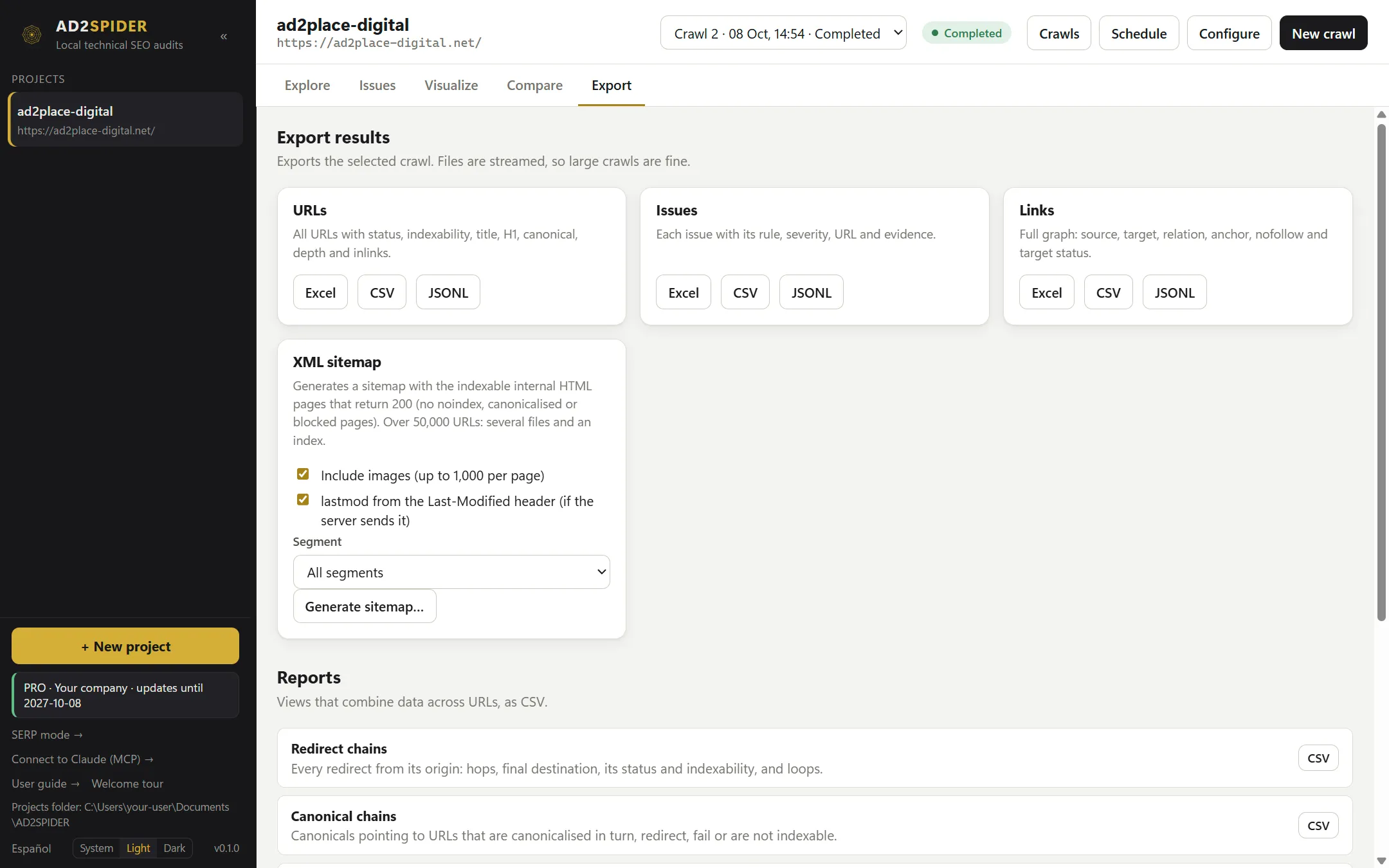
Export takes the data out of the selected crawl so you can work with it in a spreadsheet, deliver it to a client or load it into another tool. Files are written in chunks, so you can export crawls of hundreds of thousands of URLs without running out of memory.
To deliver a PDF report with your logo (executive, technical, progress, migration…), use the Client report card at the top: see Client reports.
Tables
| Table | Contents |
|---|---|
| URLs | Every URL with its status code, type, indexability and its reasons, title, meta description, H1, canonical, words, depth, size, TTFB, inlinks, redirect target and error. |
| Issues | One row per issue and URL: rule, type, priority, confidence, URL and evidence. |
| Links | Every link: source, target, relation, anchor, nofollow and target status. |
Each one can be downloaded in three formats:
- Excel (
.xlsx): ready to filter and share. Above one million rows it’s split across several sheets. - CSV: comma-separated UTF-8, which Excel opens with accented characters intact.
- JSONL: one JSON line per row, for loading into databases or scripts.
Text that starts with =, +, - or @ gets an apostrophe in front so a spreadsheet doesn’t run it as a formula.
Reports
Views that combine data across URLs, as CSV:
| Report | What it’s for |
|---|---|
| Redirect chains | Each chain from the linked URL to its final destination, with every hop. |
| Canonical chains | Canonicals that point to another page that is in turn canonicalized to another one. |
| Insecure content | HTTP resources loaded from HTTPS pages. |
| Crawl path | For each URL, the path of links through which it was reached from the start URL. |
| HTTP headers | Which headers the server sends, on how many URLs each one appears and an example value. |
| Cookies | The cookies each page sets. It requires the crawl to store full headers, which today can only be turned on with a profile or from the command line. |
| JavaScript console | The console messages from each rendered page. |
XML sitemap
Generates a sitemap with the internal HTML pages that are indexable and return 200, that is, the ones that should be in it.
- Include images (up to 1,000 per page): adds each page’s images.
- lastmod from the Last-Modified header: uses the date the server sends.
- Segment: generates the sitemap for just one part of the website.
Above 50,000 URLs, several files and a sitemap index are generated, as the protocol requires.
Other exports
- Export this view, in the explorer: saves exactly what you have on screen (tab, filter, search and segment) to Excel, with more columns than the URLs table: H2, directives, Link Score, timings, carbon footprint, rendering, accessibility, custom searches and extractions, and AI answers. It’s the fastest way to deliver, for example, “every blog page with a duplicate title”.
- Export CSV, in Compare: the full comparison between two crawls.
- Scheduled crawls and the command line can export all of this automatically.