
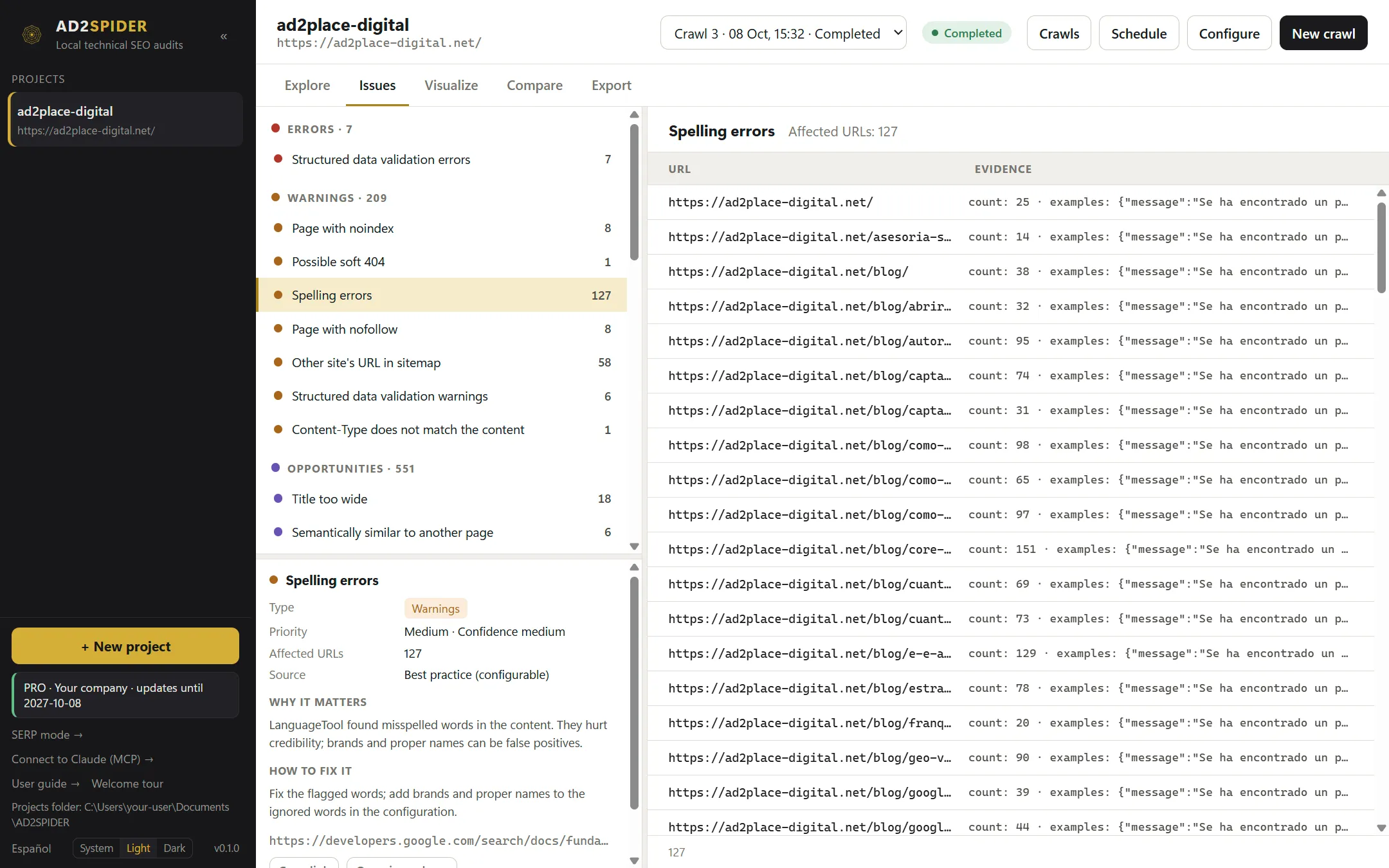
The Issues tab brings together everything the audit has found in a single list. On the left, the issues grouped; below, the card for the selected issue; on the right, the affected URLs with the evidence for each one.
Types
| Type | What it means | Examples |
|---|---|---|
| Errors | A clear technical contradiction or a broken resource. Fix these first. | Internal link to a 404, redirect loop, canonical pointing to a page that doesn’t exist. |
| Warnings | A risk that depends on context: review it and decide. | Duplicate title, page without an H1, hreflang without a return link. |
| Opportunities | A possible improvement or an editorial threshold you can adjust in Preferences. | Title too long, heavy image, thin content. |
| Info | Inventory, with no recommended change. | Paginated pages, URLs with parameters, structured data eligible for rich results. |
Each group shows its total, and each issue shows the number of affected URLs.
The issue card
When you pick an issue, its card explains:
- Type and Priority: critical, high, medium or low, along with the Confidence with which it’s detected (high, medium or low).
- Affected URLs.
- Source: what the rule is based on. Technical standard (an HTTP or HTML specification), Documented by Google, Validator (schema.org, axe…), Best practice (configurable) or Custom rule. Copy the link to the source with Copy link.
- Why it matters and How to fix it, in plain language.
- Open in explorer: opens the explorer tab that matches this issue, already filtered, so you can work with all its columns.
On the right, the Affected URLs table shows the Evidence for each one (for example, the duplicate title and which other URLs share it, or the full redirect chain). Click a URL to open its details in the explorer.
How to prioritize
- Errors with many URLs: they usually have a single cause (a template, a menu link), and fixing it corrects hundreds of pages.
- Indexability: noindex, canonicals and robots.txt blocks that affect pages that should rank.
- Internal linking: broken or redirected links, orphan pages or pages that are too deep.
- Content: duplicate or missing titles, meta descriptions and H1s; thin or duplicate content.
- Opportunities, depending on your goals.
By default, content issues (title, meta description, headings, words) are only flagged on indexable pages: there’s no point optimizing a page that has noindex or is canonicalized to another one. You can change this in Preferences.
What gets checked
More than 200 checks grouped by area:
| Area | Some of the checks |
|---|---|
| Responses | No response, blocked by robots.txt, redirect chains and loops, body too large, wrong content type, HTTP on an HTTPS site. |
| URL | Too long, uppercase, underscores, spaces, non-ASCII characters, double slashes, parameters, tracking parameters, internal searches, repetitive paths. |
| Title, meta description, H1, H2 | Missing, empty, multiple, outside the head, duplicate, too long, short, wide or narrow; title identical to the H1; skipped levels in the heading hierarchy. |
| Content | Exact duplicates and near duplicates, thin content, difficult readability, lorem ipsum, soft 404, meta refresh, spelling and grammar, pages similar in meaning and pages with low relevance. |
| Images | Broken, missing alt or with an empty or long alt, too heavy, missing size attributes, displayed at a different size. |
| Canonicals and indexability | Missing, conflicting, invalid, relative, with a fragment, outside the head, pointing to non-200 or non-indexable pages, chained; noindex, nofollow, conflicting or unknown directives. |
| Hreflang | Invalid or duplicate codes, missing self-reference, missing return link, missing x-default, pointing to non-200, noindex or non-canonical pages. |
| Links | Broken (internal, external and to bookmarks), redirected, nofollow, not crawlable, empty or non-descriptive anchors, deep pages, orphan pages, pages without outgoing links or with too many, links suggested by meaning. |
| Pagination | Sequences that are broken, loop or point to non-indexable pages. |
| Security | Mixed content, forms over HTTP, HSTS, CSP, X-Content-Type-Options and X-Frame-Options headers, referrer policy, insecure target=_blank. |
| Sitemaps | Invalid, inaccessible, too large; sitemap URLs that are invalid, external, non-200, non-indexable, canonicalized or blocked; indexable pages missing from the sitemap. |
| Structured data | Parsing errors, schema.org errors and Google rich result errors. |
| Validation | Missing or repeated head and body, invalid elements in the head, pages and resources that are too large, high carbon footprint. |
| JavaScript | Rendering errors, JavaScript redirects, console errors and warnings, blocked resources, content or tags that only exist (or change) after rendering. |
| Accessibility | WCAG A, AA and AAA violations, best practices and cases to review manually. |
| Performance | PageSpeed score, lab LCP, TBT and CLS, Lighthouse opportunities and real-user Core Web Vitals. |