
The configuration decides what gets crawled, how fast, with which limits and which analyses run. Open it with the Configure button in the project header. It applies to the next crawl: finished crawls keep the configuration they were launched with, so you can always tell which options produced each result.
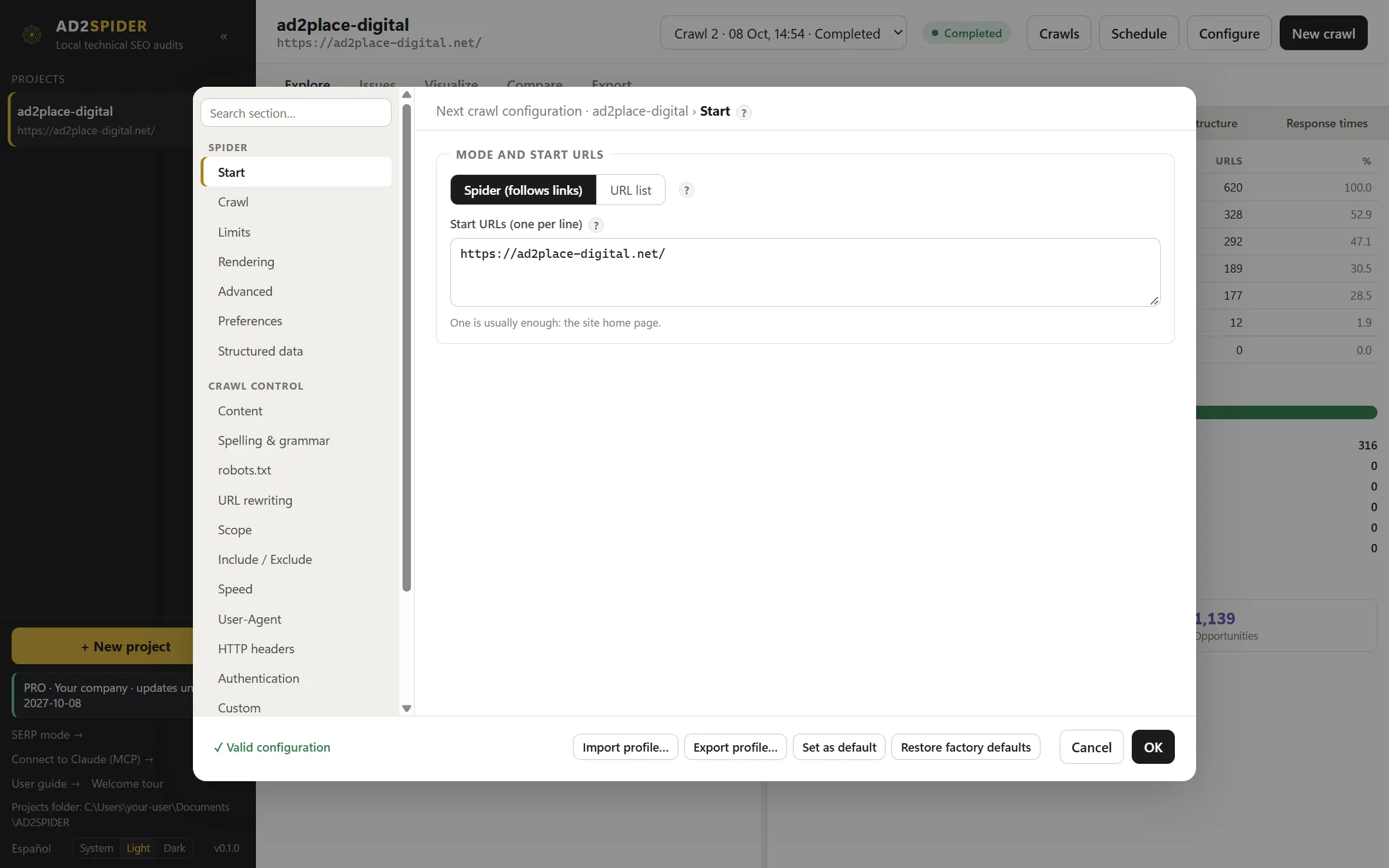
The window has three areas:
- The section tree (left), grouped into Spider, Crawl control and Integrations. The search box at the top filters sections by name.
- The open section (right). Every option has a “?”: hover over it to see what the option is for, and click More in the guide → to come to this chapter.
- The footer, with live validation and profiles.
The default values work for the vast majority of websites. If this is your first crawl, just enter the URL in Start and click OK.
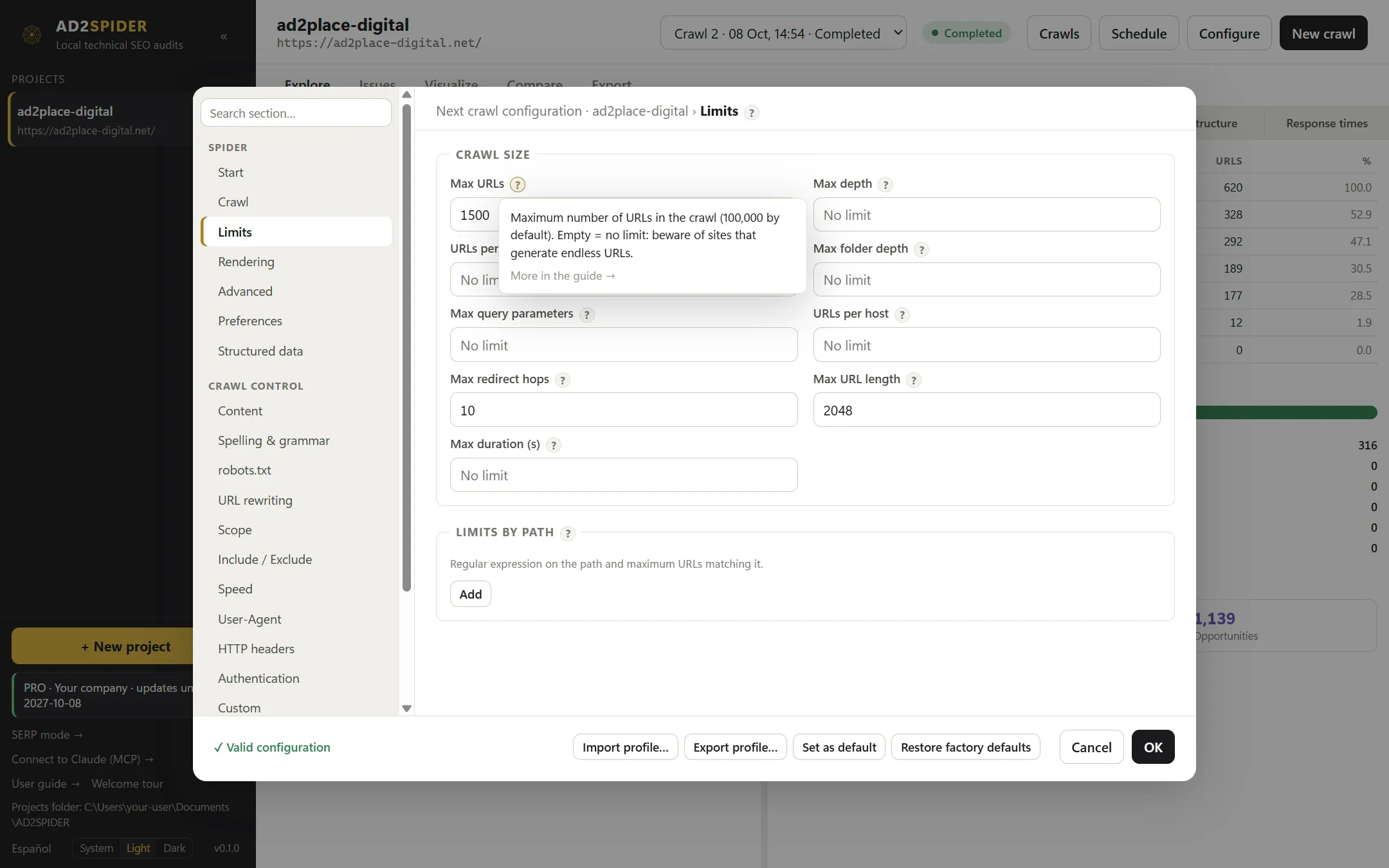
Validation and profiles
As you change options, the footer shows ✓ Valid configuration or the first error found (for example, a badly written regular expression or an integration without its key). While there are errors, OK is disabled; hover over the message to see all of them.
| Button | What it does |
|---|---|
| Import profile… | Loads a configuration saved in a .json file. The project’s start URLs are kept. |
| Export profile… | Saves the current configuration (without the start URLs) to a .json file, so you can reuse it in other projects or share it with your team. |
| Set as default | This configuration becomes the starting point for new projects. |
| Restore factory defaults | New projects go back to starting with the factory defaults. |
Profiles never include passwords, cookies or API keys: that data is stored separately and encrypted.
The robots.txt, URL rewriting, Scope and Include / Exclude sections also show the Test a URL box. Type any address and you’ll see, with the configuration currently on screen, which URL would be requested (and whether it gets rewritten), whether it would count as internal, external or excluded, whether your custom robots.txt would block it and which key it would be grouped under when looking for duplicates. It’s the fastest way to check a regular expression before you start the crawl.
Start
| Option | What it does |
|---|---|
| Spider (follows links) | Starts from the start URLs and follows links until it has gone through the site. This is the usual mode. |
| URL list | Checks only the URLs you provide, without following links. Useful for checking a migration, a list of redirects or the URLs in a sitemap. |
| Start URLs | One per line. The home page is usually enough. Add more if some areas aren’t linked from the home page (for example, another language version). |
In list mode you can paste the URLs, use Load file… (txt, csv, xlsx or a sitemap) or Download sitemap… from its address.
Crawl
Which kinds of links are followed in addition to regular <a> links. Anything not followed is still recorded (it shows up in each page’s links), but it isn’t requested.
| Option | What it does | Default |
|---|---|---|
| Images | Requests linked images to check that they load, their size and their alt text. | Yes |
| CSS / JavaScript | Requests stylesheets and scripts to check that they respond correctly. | Yes |
| Audio and video | Requests the files in <video> and <audio>. They can be very large. |
No |
| srcset variants | Requests every size of responsive images. Multiplies the number of requests. | No |
Other <link> tags |
favicon, preload, manifest… | No |
| Canonicals | Requests the canonical URL even if it isn’t linked, to check that it exists and returns 200. | Yes |
| Hreflang | Requests the language versions to check that they exist and link back. They don’t count toward depth. | Yes |
| Pagination (rel next/prev) | Follows the old pagination in the head. | No |
| Meta refresh | Follows redirects made with <meta http-equiv="refresh">. |
Yes |
| Iframes | Follows iframe content. | Yes |
| Check external links | Requests each external link once to detect broken ones, without crawling those sites. | No |
| Follow internal / external nofollow links | Also follows nofollow, ugc or sponsored links and links on pages with a nofollow meta robots tag. Google doesn’t follow them. |
No |
| Discover sitemaps from robots.txt | Reads the declared sitemaps to find orphan pages and sitemap URLs that shouldn’t be there. | Yes |
| Additional sitemaps | Sitemaps that aren’t listed in robots.txt. One per line. | — |
Limits
Caps that keep a crawl from getting out of hand. An empty field means no limit.
| Option | What it does | Default |
|---|---|---|
| Max URLs | Maximum number of URLs in the crawl. | 100,000 |
| Max depth | Maximum clicks from the start URL. | No limit |
| URLs per depth level | Maximum internal URLs at each level. Useful for taking a sample of a huge site. | No limit |
| Max folder depth | Folders in the path: /a/b/ is 2. |
No limit |
| Max query parameters | Keeps the crawl from getting lost in filter combinations (?color=…&size=…). |
No limit |
| URLs per host | Useful when crawling several subdomains. | No limit |
| Max redirect hops | Hops followed before the chain is considered broken. | 10 |
| Max URL length | Longer URLs aren’t crawled: they’re usually parameter traps. | 2,048 |
| Max duration (s) | The crawl stops when this time is reached. | No limit |
| Limits by path | Maximum URLs for paths that match a regular expression. Example: /blog/ with 500 crawls only 500 articles. |
— |
In addition, the crawl pauses on its own if the project’s disk is almost out of space: free up space and click Resume.
Rendering
| Option | What it does | Default |
|---|---|---|
| Rendering | Text only analyzes the HTML the server sends; it’s fast and enough for most websites. JavaScript opens each internal page in a browser (on Windows, WebView2; on a Mac, the Chrome the app downloads the first time) and analyzes the final result, the way Google does. Use it on sites built with React, Vue, Angular… whose content or links are generated in the browser. | Text only |
| Device | Mobile (like Googlebot smartphone) or desktop. | Mobile |
| Maximum wait after load (ms) | How long to wait for the page to finish painting content; if the network goes idle earlier, it stops waiting. | 5,000 |
| Pages at once | Each one is a browser (100–150 MB of memory): raise it only if your computer has memory to spare. | 3 |
| Screenshots | Saves a screenshot of each page (30–80 KB), visible in the URL details. | Yes |
| Accessibility audit (axe-core) | Checks the WCAG criteria on each rendered page. | No |
With JavaScript turned on, the JavaScript tab is also enabled (console errors, blocked resources, links that only exist after rendering) and, if you choose it, Accessibility.
Advanced
| Option | What it does | Default |
|---|---|---|
| Connect / First byte / Total | Network timeouts in milliseconds. | 10,000 / 30,000 / 60,000 |
| Retries | On temporary errors (5xx, network drops). | 2 |
| Accept cookies during the crawl | Like a browser. Some websites need this to show content. | No |
| Respect HSTS policy | If a site has already sent HSTS, its http:// links are treated as a hop to https:// without requesting them. When it’s off, you see the real redirect that Google sees. |
No |
| Self-referencing meta refresh = non-indexable | A page that refreshes to itself counts as non-indexable. | Yes |
| In list mode, follow redirects | Follows the redirects of the URLs in the list to their destination. | Yes |
| Store downloaded HTML | Don’t store takes up the least space; Sample stores 50 documents; All HTML pages or Everything let you look at the code afterward. | Don’t store |
Preferences
The rule thresholds. These aren’t Google rules but editorial criteria you can adapt to each project.
| Option | Default |
|---|---|
| Page title: min/max characters and pixels | 30–60 characters · 200–561 px |
| Meta description: min/max characters and pixels | 70–155 characters · 400–985 px |
| URL: max characters | 115 |
| H1 / H2: max characters | 70 / 70 |
| Alt: max characters | 100 |
| Image: max bytes | 102,400 (100 KB) |
| Low content (words) | 200 |
| Near duplicates: minimum similarity (%) | 90 |
| Max click depth | 3 |
| Max internal / external outlinks | 1,000 / 10 |
| Readability “difficult” / “very difficult” below | 50 / 30 (0–100 scale: Flesch in English, Fernández Huerta in Spanish) |
| Min words for readability | 20 |
| Non-descriptive anchors | “click here”, “learn more”, “here”… one per line |
Under Reporting:
- Ignore non-indexable pages for content issues (on): title, meta, heading or word count issues are only flagged on indexable pages, because there’s no point optimizing a page that has noindex or is canonicalized to another one.
- Report pages without canonical, Report missing HSTS and Report missing security headers (on): turn them off if you don’t care about those warnings in a project.
Structured data
| Option | What it does | Default |
|---|---|---|
| JSON-LD, Microdata, RDFa | Formats that are read. | All three |
| Validate against schema.org | Checks that the types and properties exist in the vocabulary. | Yes |
| Validate Google rich results | Missing required properties = error; missing recommended ones = warning. | Yes |
| Case-sensitive types and properties | Not recommended: Google is case-insensitive. | No |
Content
- Content area: tags (by default
navandfooter), classes and IDs that do not count as content. That way the menu, the footer, cookie banners or sidebars don’t inflate the word count or make every page look like a duplicate. Word counts, readability, duplicates, spelling, semantic analysis and the text sent to AI all come from this area. - Soft 404: phrases that give away an error page that returns 200 (“page not found”, “error 404”…). Add the ones your site uses if they’re different.
- PDF: reads internal PDFs up to 30 MB (title, author, pages, words and links, which are also crawled). Their data appears in the PDF tab.
Spelling & grammar
The check uses LanguageTool, which you download once from this section (Download and install, about 290 MB) and which works offline: the text of your pages never leaves your computer.
| Option | What it does |
|---|---|
| Check the spelling of the content | Checks the content area of each internal HTML page. It makes the crawl a little slower. |
| Check grammar too | Besides spelling, agreement, punctuation… |
| Language | Automatic (lang attribute or detection) uses each page’s language (the lang attribute or detection). Pick a fixed one for a specific variant, for example British English. |
| Ignored words | Brands, proper names or technical terms that aren’t mistakes. One per line. |
The results are in the explorer’s Spelling tab and in each URL’s details.
robots.txt
| Option | What it does | Default |
|---|---|---|
| Respect robots.txt | Doesn’t request URLs that robots.txt disallows, just like Google. | Yes |
| Report URLs robots.txt would have blocked | If you don’t respect it, it still reads it and flags what it would have blocked. | — |
| Custom robots.txt | A test robots.txt that replaces that host’s real one during the crawl. Ideal for testing changes before publishing them. | — |
URL rewriting
Changes applied to discovered URLs before they’re requested (never to the start URLs), in this order:
- Remove parameters:
utm_source,sessionid… With*at the end, every parameter that starts that way (utm_*). - Regex replacements, in order. Example:
^http://tohttps://. Supports$1groups. - Lowercase URLs.
Ignore parameters when detecting duplicates is different: the URL is crawled as is, and only the way duplicates are grouped changes.
Scope
What counts as internal (crawled and audited) and what counts as external (only checked).
| Option | What it does | Default |
|---|---|---|
| Include subdomains | blog.example.com, shop.example.com… count as internal. |
No |
| If the start URL is the root domain, include its subdomains | Starting at https://example.com/, its subdomains are internal. |
Yes |
| Crawl only inside the start folder | Starting at /blog/, anything outside it is checked but not followed. |
No |
| Intranet mode | Allows local network addresses and localhost. Off for security reasons. |
No |
| CDNs and extra hosts | Other hosts that count as internal. Supports *.domain and a folder: cdn.example.com/static/. |
— |
Include / Exclude
Regular expressions matched against the full URL, one per line.
- Include: if you add any, only internal URLs that match one of them are crawled. Example:
^https://example\.com/blog/. - Exclude: matching URLs aren’t crawled. Example:
\?orderby=to skip a store’s sort orders.
Start URLs are always crawled. Use Test a URL to check the patterns.
Speed
| Option | What it does | Default |
|---|---|---|
| Concurrent requests | In total. | 8 |
| Concurrent per host | To the same server. This is what puts the most load on the site. | 2 |
| Min delay per host (ms) | Between two requests to the same server. | 250 |
| Random jitter (ms) | Added to the delay so the pace isn’t fixed. | 100 |
| Respect server Retry-After | If the server asks you to wait (429, 503), the crawler waits. | Yes |
If the server starts returning 429 or 503 errors, lower the concurrent requests per host or raise the delay.
User-Agent
How the crawler identifies itself. AD2SPIDER identifies itself by name with an information page. Googlebot (smartphone or desktop) lets you see what the site serves to Google, but many firewalls block anyone who impersonates it: use it only on your own sites or with permission. Custom lets you write the string and the token used to look up the rules in robots.txt.
HTTP headers
Headers sent with every request to the crawled site, for example Accept-Language: es-ES to see the Spanish version. They’re stored unencrypted, so don’t put keys or tokens here: use the secret headers in Authentication for that. For security reasons, Authorization, Cookie and Host aren’t allowed.
Authentication
For crawling private areas. It’s available once the project exists, because the credentials are stored encrypted inside it.
- Login (form): click Open browser to sign in, sign in with your account as you normally would and click Save session. The crawl will use those cookies until the session expires on the site.
- Basic authentication (HTTP): for servers that ask for a username and password in a browser window (typical of staging environments). Enter the host, username and password and click Save.
- Secret headers: for sites that ask for a token in a header instead of a username and password, for example a staging site behind a firewall or CDN, or
Authorization: Bearer …. Enter the host, the header name and its value and click Save. It’s only sent to that host over HTTPS (or to the exact address of the start URL), also when rendering JavaScript; never to other domains. - Do not follow logout or delete links: while signed in, URLs that look like actions (sign out, delete, unsubscribe…) aren’t requested.
Passwords, secret header values and cookies are encrypted with a key stored in the system key store (Credential Manager on Windows, Keychain on a Mac): only your user can read them, and they’re never included in exported profiles.
Custom
- Custom search (up to 100): looks for a text or a regular expression in the HTML, in the visible text or inside a CSS or XPath selector, and creates a filter with the pages that contain it (or don’t). Example: pages without the Analytics code.
- Custom extraction (up to 100): pulls a piece of data from each page with XPath, a CSS selector (with an optional attribute) or regex: prices, authors, dates, SKUs… You can get the element, its inner HTML, its text or the value of an XPath function such as
count(//h2). - Custom JavaScript (up to 20): your code runs on each rendered page, to extract data (whatever it returns) or to act before the page is analyzed (scroll to the bottom, click a button). It requires JavaScript rendering. Add from the library… brings in ready-made examples: scroll to the bottom, dataLayer events, Google Analytics and Tag Manager IDs, main content words or lazy-loaded images that haven’t loaded.
Each search, extraction or script becomes a column and a filter in the Custom tab.
Semantic analysis
Compares the meaning of your pages with an AI model that runs on your computer: no key needed, no cost, and the content never leaves your machine. The model (multilingual, about 490 MB) is installed once from this section with Download and install.
| Option | What it does | Default |
|---|---|---|
| Analyze content with embeddings when the crawl ends | Calculates the meaning of each page and compares it with the rest of the pages in its language. About 6 pages per second. | No |
| Similar from (%) | Similarity above which two pages are considered similar: possible cannibalization. | 60 |
| Suggest link from (%) | Similarity above which a link is suggested between two pages that don’t link to each other yet. | 45 |
| Suggestions per page | Maximum suggested links. | 5 |
Anything repeated on every page (menu, footer, notices) is discarded before comparing, and each language is compared separately. The results are explained in Integrations.
AI (prompts per URL)
Sends a request (prompt) to ChatGPT (OpenAI), Claude (Anthropic), Gemini, Perplexity or Ollama for each page and saves the answer as a column. It uses your own key for each provider: the provider bills the cost of each query directly.

- API keys: paste the key for the provider you’re going to use, click Save and then Test (it costs nothing, except for a minimal query on Perplexity). It’s stored encrypted on your computer and works for every project. Ollama doesn’t need a key: install it, download a model and click Check.
- Send the prompts to the pages when the crawl ends: turns on this phase.
- Pages per prompt (max.) (100) and Text characters per page (max.) (6,000, about 1,500 tokens): these control the cost.
- Prompts (up to 20): name, provider, model (↻ loads the ones in your account), what is sent (Content or Metadata only), maximum answer length and the request. Add from template… brings in six ready-made ones: suggested title, suggested meta description, search intent, main keyword, summary, and title, meta and H1 review.
More details, costs and privacy in Integrations.
PageSpeed Insights
Measures page performance with Lighthouse on Google’s servers and adds real Chrome user data (Core Web Vitals).
| Option | What it does | Default |
|---|---|---|
| Google API key | Free, with the “PageSpeed Insights” and “Chrome UX Report” APIs enabled (25,000 queries per day). It’s stored encrypted on your computer. | — |
| Measure with PageSpeed Insights when the crawl ends | Each page takes 10 to 60 seconds. | No |
| Mobile / Desktop | Each one is a separate measurement. | Mobile |
| Maximum pages | From shallowest to deepest. | 100 |
| Real-user data (Chrome UX Report) | LCP, INP and CLS from real users over the last 28 days, for the URL or, if there isn’t enough data, for the domain. | Yes |
How to create the key and how to read the results, in Integrations.