Now available · Windows and Mac

The technical SEO audit that shows you the proof behind every issue.

AD2SPIDER crawls your site from your own computer, applies 210 rules and, for every issue, shows you the URL, the observed data, why it matters and how to fix it.

  • One-off payment, no subscription
  • Your crawls stay on your computer
  • Free forever up to 600 URLs
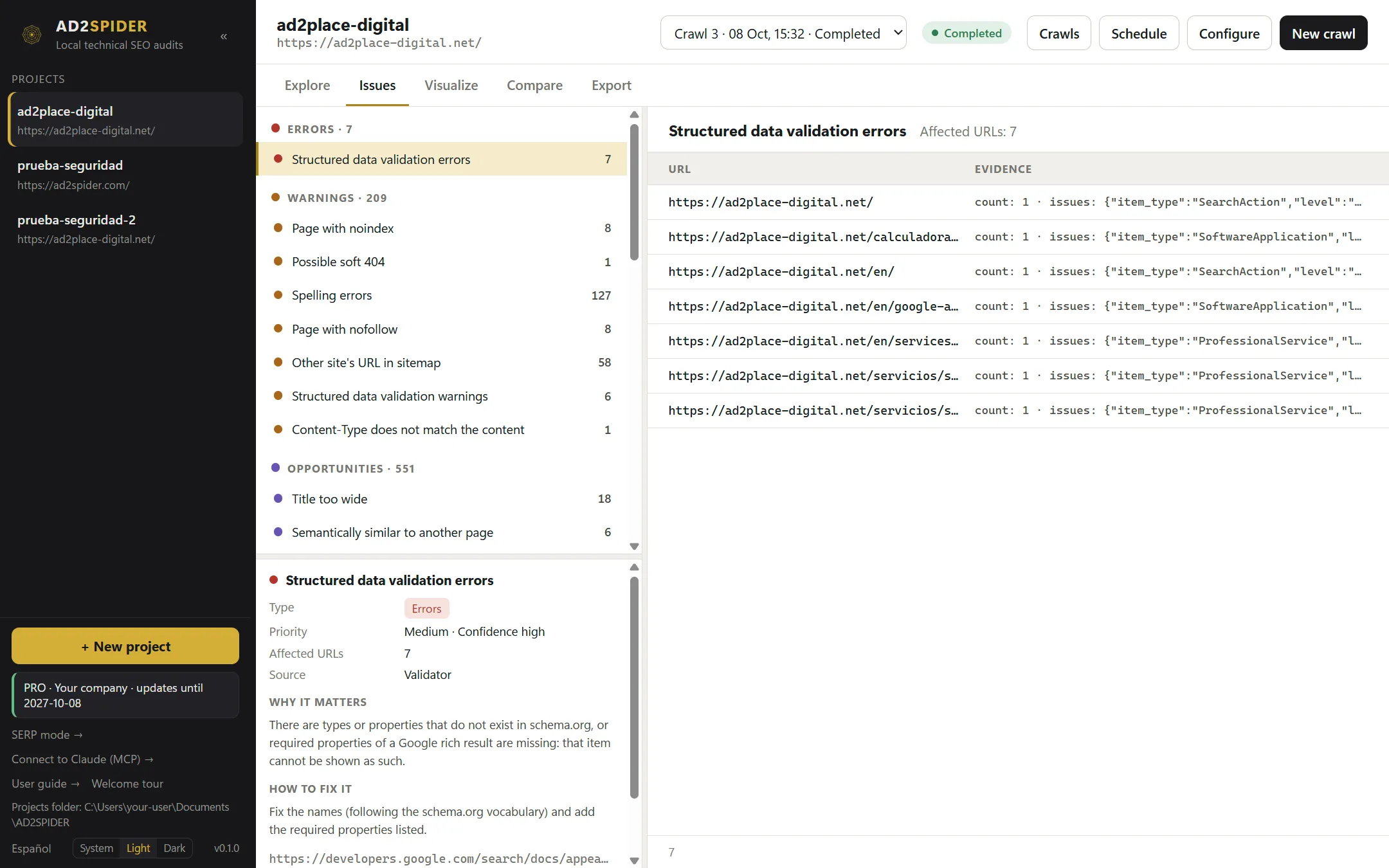
AD2SPIDER Issues view: errors, warnings and opportunities with the number of affected URLs; the "Structured data validation errors" issue with its 7 URLs and the evidence for each one, and its card with type, priority, source, why it matters and how to fix it.
audit rules
210
each with its rationale and its fix
analysis tabs
27
per element: titles, canonicals, hreflang, pagination…
of RAM for 100,000 pages
37 MB
peak measured in our internal benchmark
URLs matching the reference crawler
548/548
same status codes, titles and depth on a real crawl
The problem

A list of warnings is not an SEO audit.

Crawling the site was never the hard part. The hard part is explaining what is wrong, where, and what to do about it. AD2SPIDER is built for that part.

“Long title: 512”. Now what?

Most crawlers hand you counts. Working out what each one means, how serious it is and how to fix it is left to you.

With AD2SPIDEREvery issue comes with the URL, the observed data, why it matters, how to fix it and the official documentation.

Stop paying and lose the tool

With an annual license, the day you don't renew you drop back to the limited version, even after years of use.

With AD2SPIDERPay once. The version you have keeps working forever, whether you renew or not.

Your clients' data in someone else's cloud

Online auditors keep your crawls on their servers and cap URLs by the plan you pay for.

With AD2SPIDEREverything stays on your disk. No account, no servers of ours and no URL cap in the license.

Evidence before verdict

Every issue comes with its proof.

Open any issue and you have everything you need to fix it, or to justify it in a report, without rebuilding it yourself.

  1. The exact URL

    And the pages linking to it when the issue is in a link.

  2. The observed data

    What the crawler saw: the status code, the target, the anchor text, the header.

  3. The rule and its basis

    Technical standard, documented by Google or configurable best practice. Never opinions dressed up as rules.

  4. Why it matters

    In one sentence, so your client understands it too.

  5. How to fix it

    The concrete action and a link to the official documentation.

No promises we can't keep. Without Search Console data, AD2SPIDER talks about estimated technical eligibility. It will never tell you a page “is indexed in Google”.

How it works

Crawl any website and get your SEO audit report in five steps.

The full technical audit cycle, without jumping between tools.

  1. Configure

    Scope, speed, user agent, headers, includes and excludes. Save profiles and reuse them.

  2. Crawl

    Respects robots.txt and per-host limits. Pause whenever you like and resume where you left off.

  3. Understand

    27 per-element tabs, filters by rule and the full record of every URL.

  4. Export

    CSV, JSONL or XLSX. “Export this view” outputs exactly the filter you are looking at.

  5. Compare

    Two crawls side by side: which URLs appeared, which changed and which issues were fixed.

If you already use an SEO crawler, you already know how to use it.

Per-element tabs, filters with the number of affected URLs, configurable columns and a bottom panel with inlinks, outlinks, headers and SERP preview. What changes is what sits behind each filter: an explanation and a fix.

  • Title and description width in pixels, as on the results page
  • Folder tree, Link Score and a depth histogram by status code
  • List mode: paste or load the URLs of a migration and crawl only those
URL explorer with per-element tabs (Internal, External, Response codes, URL, Page titles…), the table of internal HTML pages with their type and status code, the overview panel with indexable pages, status codes and issues, and the details of the selected URL.

Prove progress with data.

Crawl before and after every change and compare. You'll see new URLs, missing ones, status changes and, rule by rule, how many issues appeared and how many were fixed.

  • Every crawl stores its configuration and rule version, so it is reproducible
  • Reopen any crawl offline, months later
Comparison of two crawls with different configurations: a scope-difference warning, 188 changed URLs, 61 new issues and 657 fixed, with the breakdown per rule.
What it checks

A complete technical SEO audit in 210 rules.

Editorial thresholds (lengths, depth, thin content) are configurable and shown as warnings or opportunities, not as Google laws.

  • Responses and redirects

    4xx and 5xx errors, URLs with no response, redirect chains and loops, Refresh header redirects, wrong Content-Type and HTTP pages on an HTTPS site.

  • Indexability

    noindex, canonicalised pages, conflicting directives between meta robots and X-Robots-Tag, and robots.txt blocks.

  • Canonicals

    Missing, relative, outside the head, chained, conflicting, unlinked or pointing to non-200 URLs.

  • Titles, descriptions and headings

    Length in characters and in pixels, calibrated against the search engine's font. Duplicates, missing, title equal to H1, image-only H1 and skipped heading levels.

  • Content

    Thin content, exact and near duplicates, soft 404s, forgotten lorem ipsum, readability with each language's formula, spelling and pages competing for the same topic.

  • Structured data

    JSON-LD, Microdata and RDFa validated against schema.org and Google's rich result requirements.

  • JavaScript and accessibility

    Content, links and tags that only appear after rendering, console errors, blocked resources and WCAG violations.

  • Performance

    PageSpeed score, lab LCP, TBT and CLS, real-user Core Web Vitals and Lighthouse opportunities.

  • Links

    Broken, internal nofollow, pointing to redirects, empty or non-descriptive anchors, broken bookmarks, orphan and too-deep pages.

  • Images

    Missing, empty or overlong alt, broken, too heavy or without width and height.

  • Hreflang

    Invalid codes, missing or inconsistent return links, no self-reference or x-default, and non-indexable or non-canonical targets.

  • Sitemaps

    Missing indexable URLs, non-indexable, canonicalised, blocked or multi-sitemap URLs, and unreachable or oversized sitemaps.

  • Security

    HSTS, CSP, nosniff, clickjacking protection, mixed content, target=_blank without noopener and forms over HTTP.

  • Pagination

    Broken or looping sequences, paginated pages that are non-indexable or not 200, and pagination links missing from the content.

  • Document validation

    Multiple head or body elements, invalid head elements, oversized HTML or resources and a high carbon rating.

  • URLs

    Uppercase, underscores, spaces, double slashes, campaign parameters on internal links and overlong URLs.

  • And it grows with every version

    The rule catalog is versioned and separate from the crawler: rule improvements ship without touching the crawl engine.

    Technical standardDocumented by GoogleConfigurable best practice

See every check, with why it matters and how to fix it →

Beyond the audit

One SEO audit tool for all your day-to-day work.

Performance, content, AI, automation and visualization in the same application. What can run on your computer, runs on your computer.

  • On your computer

    JavaScript rendering

    Audit sites built with React, Vue or Angular the way Google sees them. Compare the original and rendered HTML, with screenshots, console errors and blocked resources.

    See in the guide →
  • Free Google key

    PageSpeed and Core Web Vitals

    Lighthouse score, lab LCP, TBT and CLS, and real-user LCP, INP and CLS from Chrome, page by page, with improvement opportunities.

    See in the guide →
  • On your computer · free

    Semantic analysis

    Finds pages competing for the same topic in different words, off-topic pages and missing internal links. A multilingual AI model that works offline.

    See in the guide →
  • Your key or local Ollama

    AI with your own key

    Send prompts to every URL with ChatGPT, Claude, Gemini, Perplexity or Ollama: suggested titles and metas, search intent, summaries… Each answer is a column.

    See in the guide →
  • On your computer

    Spelling and grammar

    Offline LanguageTool in eleven languages and variants, with ignored words for brands and proper names.

    See in the guide →
  • On your computer

    Accessibility

    WCAG A, AA and AAA audit of every rendered page with axe-core, with the affected elements.

    See in the guide →
  • Custom

    Custom extraction

    Up to 100 searches, 100 extractors with XPath, CSS or regex and 20 JavaScript snippets per crawl. Prices, authors, SKUs, analytics tags…

    See in the guide →
  • Authentication

    Private areas

    Crawl staging sites and client areas with form login or basic authentication. Credentials are stored encrypted.

    See in the guide →
  • Architecture

    Visualization

    Crawl tree, directory tree and force-directed graph to grasp the architecture at a glance and explain it to a client.

    See in the guide →
  • Tracking

    Comparison and migrations

    What got fixed and what got worse between two crawls, even between staging and production thanks to URL mapping.

    See in the guide →
  • Organization

    Segments

    Split the site into parts (blog, languages, product pages) to filter, see their figures separately or generate their own sitemap.

    See in the guide →
  • Automation

    Scheduling and command line

    Recurring crawls with Windows or macOS scheduled tasks, even with the app closed, and a full CLI for your scripts.

    See in the guide →
  • AI assistants

    Connect to Claude (MCP)

    Ask Claude about your audits: what errors there are, what to fix first, what changed. Read-only, and the data stays on your computer.

    See in the guide →
  • Deliverables

    Client reports

    PDFs with your logo: executive, technical, content, performance, monthly progress and migration. Summary and action plan written by AI with your own key, generated automatically by scheduled crawls and emailed to the client from your own account.

    See in the guide →
  • Deliverables

    Exports

    Excel, CSV and JSON, seven cross-URL reports (redirect chains, insecure content, crawl path…) and XML sitemaps with images.

    See in the guide →
  • Copywriting

    SERP mode

    Measure titles and descriptions in pixels, the way Google truncates them, without crawling. Paste your copy or load a CSV of up to 100,000 rows.

    See in the guide →

Everything explained, screen by screen, in the user guide →

Local first

A desktop website crawler: your crawls stay on your disk.

You audit client websites. That data has no reason to go through anyone's server, ours included.

  • No account

    Install, activate the license (offline too) and get to work.

  • No servers of ours

    Crawls, configuration and exports are saved in your Documents folder. PageSpeed and AI are only used if you turn them on, and we tell you what gets sent.

  • No remote kill switch

    Nobody can remotely disable the version you paid for.

  • Polite to the sites you crawl

    robots.txt per RFC 9309, per-host limits, careful retries and a user agent that identifies itself.

Handles big sites with little memory

Data goes to disk, not RAM. This is how it behaves in our benchmark:

Internal crawl and audit benchmark
Crawl + auditTimeDiskPeak RAM
10,000 pages10–14 s60 MB27 MB
100,000 pages2.7–5.5 min610 MB37 MB

Measured on a local test site on Windows 11. On a real site, the server's speed and the politeness you configure set the pace. If free disk space drops below 1 GB, AD2SPIDER pauses safely and resumes later.

Perpetual license

Pay once. Your version is yours.

No subscription in disguise. An expired license never disables a version you are already entitled to. What you see is what you pay. Full stop.

  1. Day 1

    You pay once

    A perpetual license for the major version you buy.

  2. Months 1–12

    Every update

    New rules, improvements and fixes included.

  3. After that

    Your version keeps working

    No expiry date. Renew only if you want the new versions, at a discount.

How it compares with the usual alternatives

How AD2SPIDER compares with the usual alternatives
AD2SPIDERDesktop crawler with an annual licenseCloud SEO auditor
PaymentOne-offYearly feeMonthly or yearly fee
If you stop payingYour version keeps workingYou drop back to the limited versionYou lose access
Where your data livesOn your computerOn your computerOn the vendor's servers
URL limitYour hardware'sYour hardware'sSet by the plan
Open crawls offlineYesYesNo
Explanation and fix for every issueYes, with its basisDepends on the toolDepends on the tool
Pricing

One license, no small print.

Perpetual license, no subscription. Try it for free before you buy.

Free

To get started and for small sites

€0

14 days with no limit; then 600 URLs per crawl, forever

  • Every rule and tab
  • 14 days with no URL limit
  • Then up to 600 URLs per crawl, no expiry
  • Crawl comparison
  • Full exports
Download for free

EU consumers: €119.79 including VAT. EU businesses with a VAT ID: no VAT. For 64-bit Windows 10 and 11 and macOS 11 or later; each license covers 2 computers running either. Linux will follow.

Roadmap

What it does today and what's coming.

We'd rather you know exactly what you are buying. What isn't finished isn't sold as if it were.

Available

  • Spider and list mode crawling, with pause and resume
  • 210 checks with evidence, rationale and fix
  • 27 per-element tabs, filters, columns and segments
  • Tables you can sort by column, with multi-select, copy to Excel and keyboard shortcuts
  • JavaScript rendering and accessibility audit
  • PageSpeed Insights and real-user Core Web Vitals
  • Local semantic analysis: cannibalization and suggested links
  • AI with your own key: ChatGPT, Claude, Gemini, Perplexity or Ollama
  • Offline spelling and grammar
  • Custom extraction and crawling behind a login
  • Visualization, crawl comparison and migrations
  • Excel, CSV, JSON, cross-URL reports and XML sitemaps
  • Client-ready PDF reports with your logo, migration reports included
  • AI-written reports with your own key, also generated by scheduled crawls
  • Scheduled reports emailed to the client from your own email account
  • White-label reports (included in the license)
  • Scheduled crawls, command line and Claude integration
  • Crawl progress with speed and time, and a shutdown that leaves no processes behind
  • Release notes shown inside the app after each update
  • Help on every setting and a complete user guide
  • 22-lesson video course, in English and Spanish
  • Windows and Mac (Apple silicon and Intel), digitally signed and verified
  • English and Spanish, perpetual license and signed updates

In progress

  • Checks for AI search: AI bots in robots.txt, llms.txt and content that only appears with JavaScript
  • Let your AI assistant start, pause and configure crawls, not just query them
  • Open Graph checks and how each page looks when shared
  • More bulk exports and Markdown export
  • "Start here": what to fix first, and marking issues as resolved
  • Quality gate from the command line to stop a deploy with errors
  • Free online redirect checker
  • Practical technical SEO guides in the Learn section

Coming next

  • Google Search Console and Google Analytics 4
  • Export to Google Sheets and Looker Studio
  • Visual map of semantic clusters and search by meaning
  • Server log analysis, including AI bots
  • Linux version
  • One-million-URL crawls
  • External link metrics from backlink providers

No fixed dates. "In progress" is the next version; the order of the rest may change with what users ask for.

FAQ

What people usually ask us.

Can it replace the crawler I use today?

For technical audits, yes. The interface follows the usual logic of desktop crawlers, with one tab per element and filters, so switching is quick. In a full crawl of a real 548-URL site, checked against the industry's reference crawler, it found the same URLs, status codes, titles and depth. It also renders JavaScript, measures PageSpeed and Core Web Vitals, analyzes content with AI and runs on a schedule. Search Console and GA4 are on the roadmap.

Do I need an account or an internet connection?

No account needed. You need a connection to crawl websites, obviously, but not to open, filter, export or compare saved crawls. The license can also be activated offline.

What happens when the 12 months of updates run out?

Nothing bad: the last version you received keeps working forever. If you want the versions released afterwards, you renew maintenance at a discount. If not, you keep working with yours.

How many URLs can I crawl?

The license sets no cap: your hardware does. AD2SPIDER stores data on disk rather than in memory: in our benchmark, 100,000 pages used 37 MB of RAM and about 610 MB of disk. If free space drops below 1 GB, it pauses the crawl safely.

Does it run on Mac or Linux?

On Mac, yes: it runs on macOS 11 or later, Apple silicon or Intel, signed and notarized by Apple. Also on 64-bit Windows 10 and 11. One license covers 2 computers running either system. Linux is planned, with no fixed date.

Which languages is it available in?

The app is in English and Spanish, including every rule's explanation and fix. You switch with one click.

Do I have to pay for an AI to use the AI features?

Not necessarily. Semantic analysis (cannibalization, off-topic pages, suggested links) runs on your computer with no key and no cost. To send prompts to each page you use your own ChatGPT, Claude, Gemini or Perplexity key, and the provider bills you directly for what you use (with a small model, cents per hundred pages); or Ollama, which is free and runs on your computer.

Is there documentation?

Yes: a complete user guide in English and Spanish, with screenshots of every screen. On top of that, every setting has a “?” that explains what it does and links to its section of the guide.

Can I use it to audit my clients' websites?

Yes. Every license allows commercial use, and since the data never leaves your computer, you don't have to explain to your clients where their crawls end up.

Does AD2SPIDER tell me whether my pages are indexed?

No, on purpose. Without Search Console data nobody can claim that. AD2SPIDER reports estimated technical eligibility: whether a page meets the observable conditions to be indexed (returns 200, isn't blocked, has no noindex, has a consistent canonical…).

Does it respect robots.txt?

Yes, by default, following RFC 9309, with per-host rate limits. You can ignore it on your own sites and still see what it would have blocked. The crawler identifies itself with its own user agent.

What does the free version include?

For 14 days, every feature with no URL limit. After that it keeps working for free, forever, with up to 600 URLs per crawl, exports included. We only ask for an email to send you the download link.

How much does it cost and how do I buy it?

€99 + VAT per seat, one-off payment: a perpetual license with 12 months of new versions and support. You buy it from the app (the “Buy a license” button, with your computer's fingerprint already filled in) or on the website, and the license is emailed to you. There is a 14-day money-back guarantee.